 FileFroggy
Identity survives moves
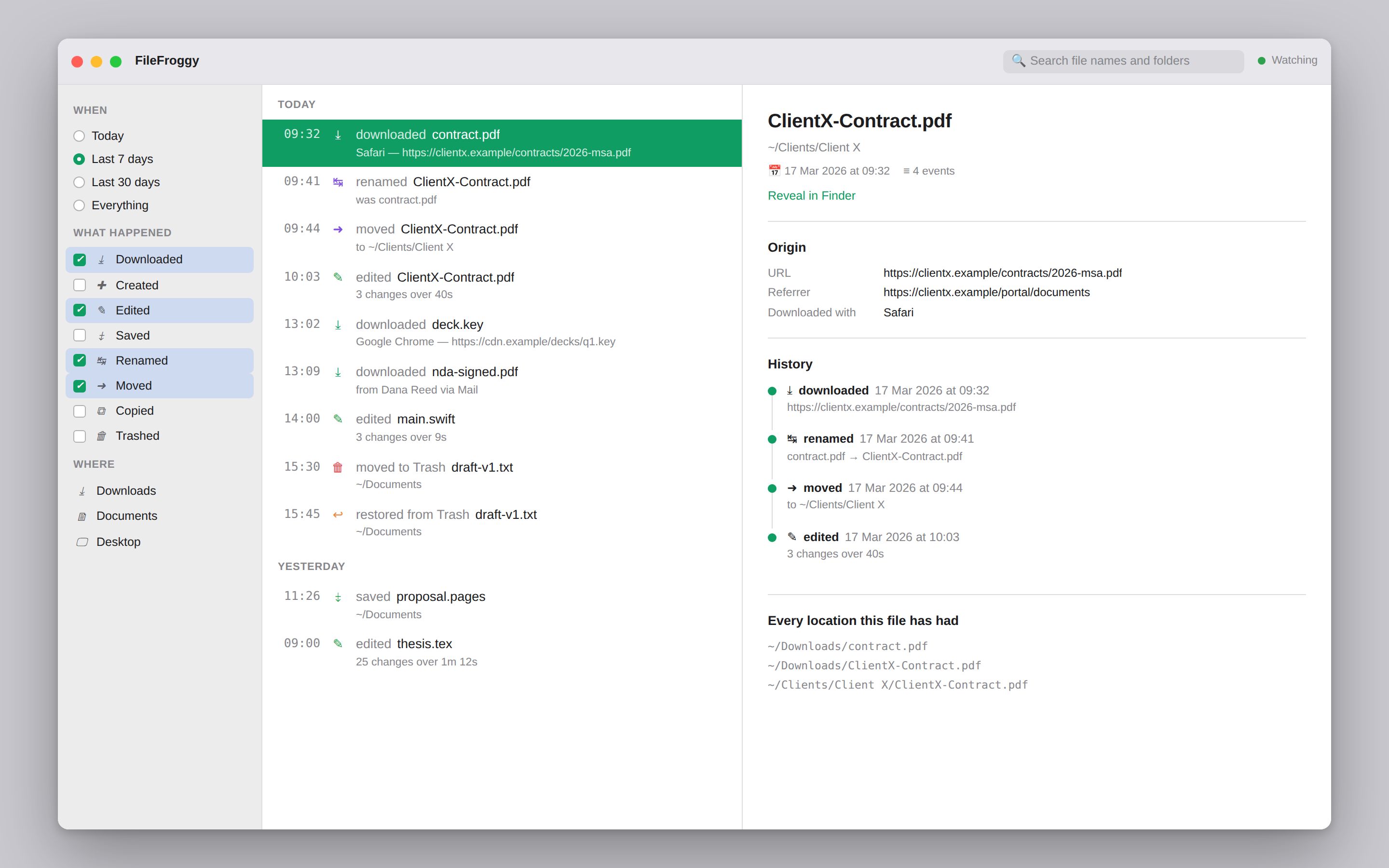
Files are tracked by volume and inode, not by path. Rename it, refile it, rename it again — it stays one story instead of fragmenting into three strangers.
Not a list of recent files. A chronological ledger of what you actually did — downloaded, renamed, moved, edited — with each file's whole life kept as one story.
One-time payment, no subscription · macOS 13 or later · Nothing ever leaves your Mac
One file. Four entries. Three different paths — and it knows they're all the same document.
Finder forgets. Froggy remembers.
The problem
Finder Recents shows files, not events, and loses the thread the moment a file moves. Raw filesystem monitors show everything — which is unreadable, because a single save in Word emits a dozen kernel events. The useful thing lives in between, and getting there is a correlation problem.
Files are tracked by volume and inode, not by path. Rename it, refile it, rename it again — it stays one story instead of fragmenting into three strangers.
macOS apps save atomically: write a temp file, rename it over the original. The inode changes every time you press ⌘S. Miss that and every save splits a file's history in half.
Autosave bursts collapse into sessions with counts and durations. Caches, lock files and build output never appear at all.
created  .report.sb-a1b2-XyZ
modified .report.sb-a1b2-XyZ
renamed  .report.sb-a1b2-XyZ
renamed  report.pages
removed  report.pages
modified .DS_Store
created  DerivedData/o0.o
created  DerivedData/o1.o
created  DerivedData/o2.o
modified node_modules/pkg0/index.js
modified node_modules/pkg1/index.js
created  .git/index.lock
modified main.swift
modified main.swift
modified main.swift
…41 more
14:00  edited   main.swift
       3 changes over 9s

14:02  edited   README.md
See it
A real recording of the correlation engine: its full test suite, then six scenarios replayed from raw event streams into readable ledgers. This is the code in the repository producing that output.
conformance.py --demo
turning raw filesystem events into ledgers — including 56 build events reduced to the
2 a human performed, and four safe-saves that stay one file.
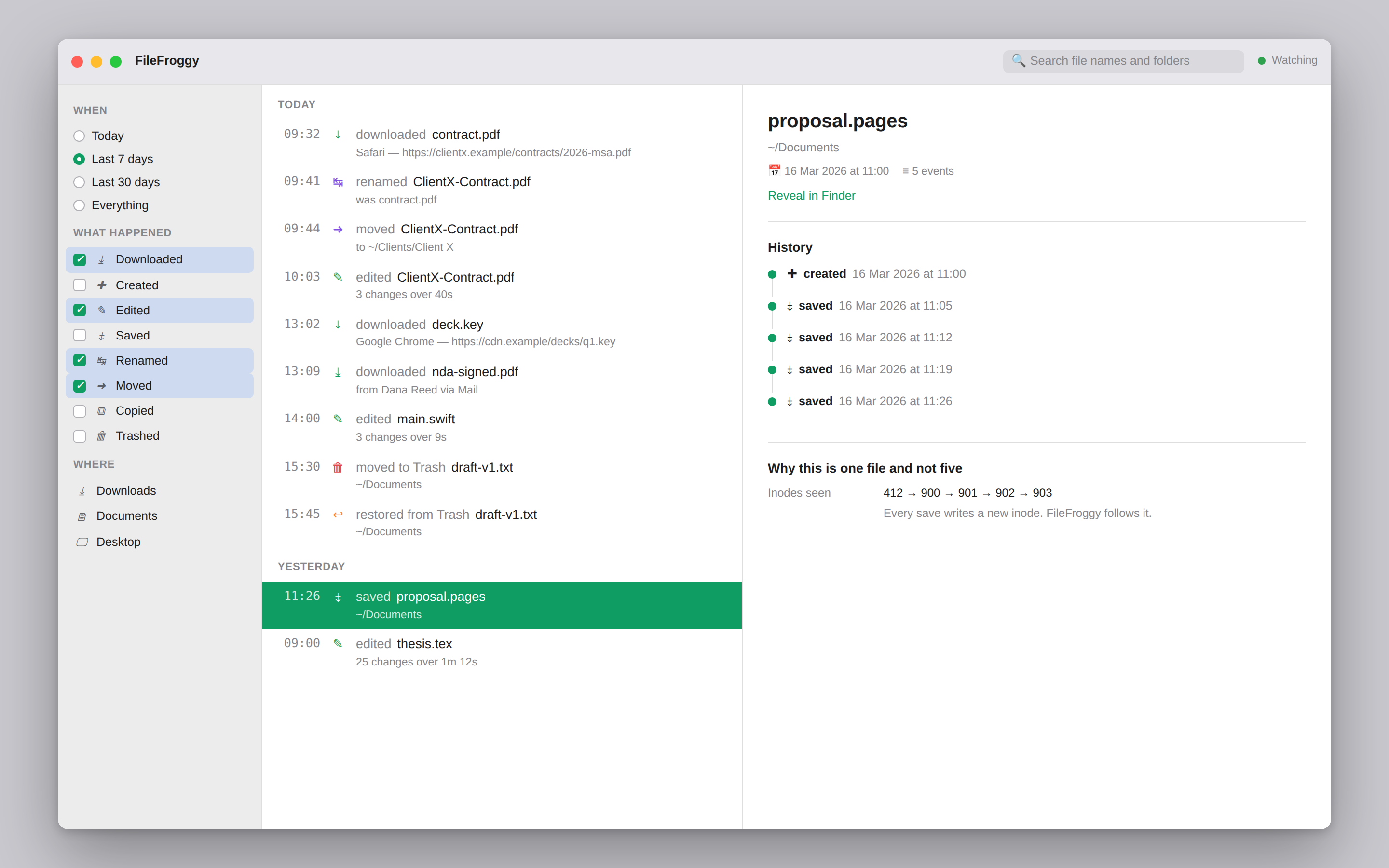
412 → 900 → 901 → 902 → 903 — and it is still one file.
Straight answers
Tools in this space routinely overpromise on history. macOS stores current state, not a timeline, and that limit is worth stating before you rely on it.
| Question | Looking back | Source |
|---|---|---|
| What did I download, when, and from where? | Yes — in full | Quarantine database + file attribute |
| What files exist and when were they created? | Yes | Spotlight |
| When was each last modified or opened? | Last time only | Spotlight |
| Every edit, not just the most recent | No | — |
| Where a file used to live | No | — |
| When a file was renamed | No | — |
From the moment it starts watching, FileFroggy records everything — including renames and moves. That part is solved.
Reaching backwards is different. Spotlight keeps only the last modified and opened date per file, and the system's event log is capped per volume and cleared on an unclean shutdown. Retroactive rename and move history does not exist on macOS. No amount of engineering recovers it, and anything claiming otherwise is overpromising.
The happy exception: download history is fully recoverable, years back, because provenance is stored on the file itself rather than in a log that expires.
A local SQLite database, nothing uploaded anywhere. Retention is configurable with a hard delete — a permanent record of everything you've ever touched is a liability, not a feature.
Process attribution needs Apple's Endpoint Security entitlement, which is a months-long approval and rules out the Mac App Store. It's the natural second version, not a launch blocker.
Where things stand
The correlation engine — the part this product lives or dies by — is implemented and tested against golden fixtures. The Mac application around it is written and awaiting its first compile. Every claim on this page is checkable in the repository.
| Component | State | Detail |
|---|---|---|
| Correlation engine (reference) | Tested | 40 unit and property tests passing |
| Conformance fixtures | Done | 6 scenarios, deterministic |
| Correlation engine (Swift) | Written | Awaiting first compile |
| FSEvents, quarantine, Spotlight | Written | Awaiting first compile |
| App, storage, export | Written | Awaiting first compile |
| Signed, notarized build | Not started | — |
Pricing
No subscription for a utility that watches your own filesystem.
one-time purchase
One-time payment. Download and licence key arrive by email at launch.
Questions
Finder Recents lists files, not events, and loses the thread as soon as a file moves. FileFroggy records what you did — downloaded, renamed, moved, edited — in order, and keeps each file's whole history together even after it changes name and folder several times.
Partly, and the distinction matters. Download history is fully recoverable years back, because provenance is stored on the file itself. Creation dates and the most recent modified and opened dates come from Spotlight.
But macOS keeps no history of renames and moves, so retroactive move history cannot be recovered — not by this app, and not by any other.
No. The ledger is a local SQLite database. Nothing is uploaded, there is no account, and retention is configurable with a permanent delete. See the privacy policy.
FSEvents, the macOS API that reports filesystem changes, never identifies the responsible process. Getting that requires Apple's Endpoint Security entitlement, which is granted case by case and requires shipping a system extension outside the Mac App Store. It's planned for a later version.
Watching Downloads, Documents and Desktop needs ordinary folder consent — three prompts on first run. Reading download provenance additionally needs Full Disk Access, which macOS only lets you grant manually in System Settings.
The app is designed to be useful before you grant Full Disk Access, because many people never will.
macOS 13 Ventura and later, on both Apple silicon and Intel.
No — a one-time purchase, with free updates within the major version.